
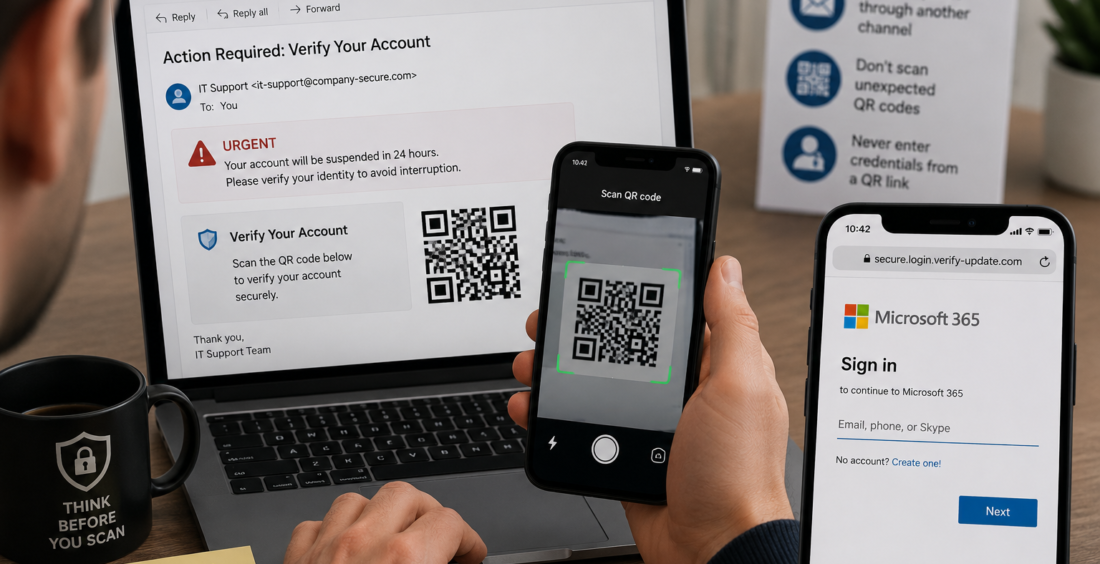
QR code phishing, often called quishing, is becoming a bigger cybersecurity problem because attackers can hide a malicious link inside an image that looks ordinary.
People scan QR codes every day. That familiarity makes the format useful to criminals.
A phishing email with a visible web link may trigger suspicion. A QR code gives the victim less information at a glance and often moves the next step onto a phone, away from the company device where security controls may be active.
Why QR Code Phishing Is Growing
An attacker sends a QR code that points to a fake login page, malicious website or another stage of an attack.
Microsoft reported that QR code phishing was the fastest-growing email attack vector in the first quarter of 2026, more than doubling during the period.
QR codes are familiar, easy to create and can be placed inside emails, PDFs, documents or images.
The victim sees a square image rather than a suspicious URL. By the time the destination appears, they may already be using a personal phone.
Moving the Attack to a Phone Changes the Game
Many organizations have strong email security on company laptops. Links can be scanned, dangerous websites blocked and browsers monitored.
A QR code can move the interaction to another device.
An employee may open a work email on a laptop, scan the code with a personal phone and continue there. The fake page may ask the user to sign in to Microsoft 365, Google Workspace or another familiar service.
If the page looks convincing, the victim may enter credentials without realizing the original email was the trap.
The Message Creates a Reason to Scan
Attackers know a QR code needs context.
They may claim that a password is expiring, a document is waiting, payroll information needs review or multi-factor authentication must be updated.
Microsoft documented a 2026 tax-themed campaign in which phishing emails sent to around 100 organizations included a document containing a QR code that led to a credential-phishing page.
The strength of the attack came from giving the victim a believable reason to scan.
That is why security awareness should focus on the request, not only the appearance of the message.
A Realistic Login Page Can Follow
Scanning the QR code is only the beginning.
The destination may copy a real sign-in page. Some phishing platforms can use adversary-in-the-middle techniques to capture more than a password, including authentication tokens or session cookies.
Microsoft’s analysis of Tycoon2FA found that campaigns often used attachments containing QR codes as part of the lure.
This means multi-factor authentication remains important, but users should still question unexpected requests that send them into a login flow.
A familiar brand logo is not proof that the page is genuine.
What Employees Should Look For
Employees do not need to stop scanning every QR code.
They do need to pause when a code arrives unexpectedly and asks them to sign in, confirm sensitive information or make a payment.
If a message claims to come from IT, HR or a supplier, the user can verify the request through a known channel before scanning.
CISA recommends avoiding links and contact details contained in suspicious messages and using another trusted method to confirm whether the request is real.
The same principle works for QR codes.
If the message creates urgency, verification becomes more important, not less.
Security Tools Need to Look Inside the Image
Organizations also need technical defenses.
Email systems should detect QR codes, extract the destination and evaluate where the code leads. Web filtering and mobile security can provide another layer if the user scans the code anyway.
Security teams should also look at the full attack path.
A suspicious QR email followed by an unusual mobile login or new session may provide stronger evidence than either event on its own.
Good cybersecurity depends on connecting signals instead of treating each event separately.
QR Codes Are Not the Problem
QR codes are useful technology. The problem is the trust people place in them.
A square image can hide the destination until someone scans it, giving attackers room to create curiosity, urgency or confidence.
Businesses should teach one practical habit: treat an unexpected QR code like an unexpected link.
Check why it was sent. Verify sensitive requests. Be cautious when the destination asks for credentials, payment information or account changes.
Microsoft’s 2026 data shows that attackers are leaning harder into this technique because it works.
The question is not, “Can we trust QR codes?”
It is, “Do we know who wants us to scan this one, and why?”
That pause can turn a convincing quishing attempt into a reported email instead of a compromised account.
Contributed by GuestPosts.biz
Further Reading: Cyber Gear Thought Leadership Series







Comments are closed.