
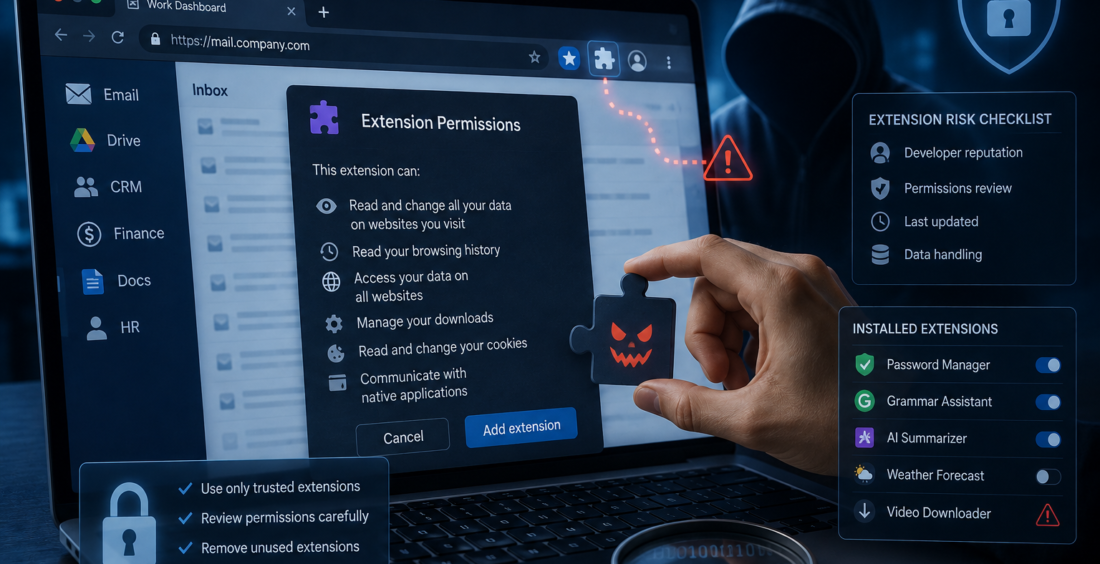
Browser extension security is becoming a cybersecurity concern as more work moves into browsers. Employees use extensions to manage passwords, take notes, translate pages, improve writing and connect AI tools to everyday tasks.
Most extensions are useful. The risk is that some receive access to far more than people realize.
An extension may read webpage content, see visited sites or interact with an active browser session. If that extension is malicious, compromised or over-permissioned, a small add-on can become a powerful security problem.
Why Browser Extensions Deserve More Attention
The modern browser is no longer just a way to visit websites.
For many employees, it is the workplace. Email, cloud storage, customer systems, finance platforms and collaboration tools may all be open in separate tabs.
Google’s Chrome documentation explains that extensions request permissions to access browser features and websites. Some permissions allow an extension to interact with page content or network requests.
That access may be necessary for the extension to work. But security teams should understand what an extension can see and do before trusting it.
A Trusted Extension Can Change
One harder problem is that an extension can be safe when installed and risky later.
Extensions receive updates like other software. Ownership can change. A developer account can be compromised, or a new version can introduce behavior that was not present before.
A tool installed months ago can keep running while its permissions or code change. This is why checking an extension once at installation is not enough.
Organizations need to know what is installed and whether that software is still trustworthy.
Permissions Matter More Than Popularity
Ratings and download numbers can help, but they do not replace a permission review.
A simple writing tool probably does not need access to every website a user visits. An extension designed for one internal application should not automatically require broad access across the browser.
Google recommends that extension developers request the minimum permissions needed for their features.
Businesses can apply the same idea. Before allowing an extension, ask whether its requested access makes sense for the job it claims to do.
The Browser Can Hold Valuable Sessions
The risk becomes more serious because browsers often contain active sessions for important business accounts.
An employee may already be signed in to email, cloud storage, finance systems and internal applications. Session cookies and tokens help those services remember that the user has authenticated.
A malicious extension with the right access may collect sensitive browser information or observe activity around those sessions.
That can turn a browser problem into an identity problem.
Good cybersecurity should therefore treat browser extensions as part of the same security conversation as passwords, tokens and cloud access.
AI Extensions Add Another Layer
AI browser extensions are popular because they can summarize pages, rewrite text and assist with research without making the user switch applications.
That convenience can increase the amount of information an extension encounters.
An AI extension may process email text, documents, prompts or webpage content. If employees use it with sensitive business information, security teams need to understand how that data is handled and where it goes.
Convenience can encourage people to grant broad access without thinking about what the tool can see.
Companies Need Visibility, Not a Blanket Ban
Blocking every browser extension would remove useful tools, so a better approach is to manage extensions based on risk.
Organizations should know which extensions are common, which permissions they request and whether they come from trusted developers. High-risk extensions can be blocked, while approved tools can be made available.
Chrome Enterprise provides administrators with controls to manage which apps and extensions users can install.
That gives companies a middle ground between allowing everything and blocking everything.
Remove What Nobody Uses
Old extensions create unnecessary attack surface.
Someone may install a tool for one project and forget about it. Months later, it still has browser permissions even though nobody needs it.
Employees should remove extensions they no longer use, and companies should review approved lists periodically. An extension that no longer serves a business purpose should not keep access simply because it has always been there.
Small Add-Ons Need Serious Security
Browser extensions rarely look like major technology decisions. They can be installed in seconds and disappear into a toolbar.
Security teams should treat them as software with real permissions, not harmless browser decorations.
Know what is installed. Review access. Keep approved extensions limited. Remove unused tools and pay attention when permissions change.
The question is not simply, “Is this extension useful?”
It is, “What could this extension reach if it became malicious tomorrow?”
That question brings browser extension security into the cybersecurity conversation where it belongs.
Contributed by GuestPosts.biz
Further Reading: Cyber Gear Thought Leadership Series







Comments are closed.